






It’s still very simple to change your display settings with Windows’ new operating system Vista.
First right click your mouse while on your Vista desktop.This will bring up an options box. Next, select the bottom item “personalize”. This will pop up your personalization, appearance and sounds box.

Select display settings at the bottom. This will bring up your monitor’s display settings.
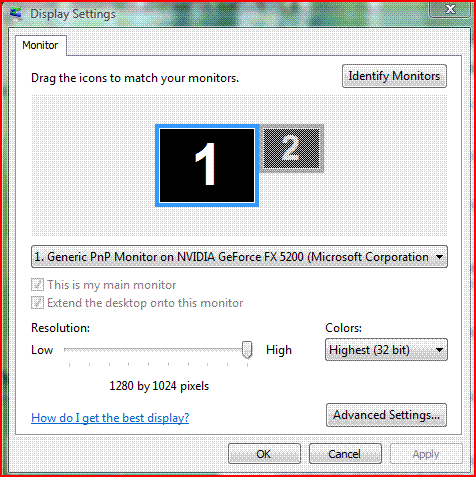
Just move the slider resolution bar from side to side to select the desired settings. In this window you can also adjust your color settings to its max for more life-like colors.
Thank you for the help, simple problem but I could not figure it out
mk
Is there a way to change the resolution to one that is not shown on the slider? My laptop is stuck on 1024×768 at its best, but i need 1280×800 for my 15.4″ screen.
cheers
i use 22 inch monitor but when change to 1600by1200 pixel it said out of range? so wat happen with my pc?
Klink: That usually means your video card can’t handle those settings.
I cannot ajust my resolution because my display is too large to see the bottom of the screen in order to ajust screen. I cannot get the screen or objects on the screen to get small enough to see the bottom in order to even move the cirsor. Please help
How do I CHANGE MY DISPLAY BACK TO LANDSCAPE?